Dear All
BCC has declared their National ICT Internship. You can apply if you are interested. Here, I enclose the notice in attachment.
--
[Regards]
Zohirul Alam Tiemoon.
Consultant.
BASIS (www.basis.org.bd), Dhaka.
Bangladesh.
~[ Details Info Here ]~
Showing posts with label Tech News. Show all posts
Showing posts with label Tech News. Show all posts
Tuesday, September 15, 2009

Wednesday, September 2, 2009
Banglasavvy 0.0.5 (Beta Version)
Windows XP/2000/98/NT

Author: Banglasavvy
License: Freeware!
Description:
Banglasavvy is a Virtual Unicode Bangla Font Installer for Windows XP/2000/98/NT. It will let you install ‘Bangla Font’ virtually to any system regardless of Administrator privilege. That means when you have limited access to some PC and do not have permission to install anything including fonts, this tool will be very handy then.
Instruction:
* Just download and run.
* The application will extract ‘Likhan’ font to the same folder for the first time and virtually Install the font; It also set the ‘Likhan’ as your default Bangla locale font for IE (Internet Exorer). A ‘Icon’ will be added to the ’systray’ of your system.
* Close all open window. Rerun, your application will see the ‘Likhan’ font and it will be usable while the banglasavvy.exe running.
* Right click on the systray Icon and select ‘Exit’ if you wants to close this Bangla tools.
Requirement:
No Installation will be required to run the application on Windows XP. It will also works on Windows 98/ME/2000 if there is Visual Basic Runtime files installed (download link avalaboe below).
Download: Click here to download
Additional Download: Visual Basic 6.0 Runtime Files (SP6) - For running Banglasavvy in Windows 98/ME/2000
Source : http://www.omicronlab.com/tools/banglasavvy.html
IComplex 2.0.0 (Full Edition)
Author: http://www.VistaArc.com/
License: Freeware!
Description:
Most of the time, when a new user tries to use Bangla on their system, complains that Bangla typing is not working in his/her system, Juktakkhor/Kar is not coming properly etc. This is the mostly asked support request in OmicronLab. All they make a simple mistake, that is, there system must be configured be fore they can use Bangla. Hence Bangla (and all east Asian languages) is a "complex script", it is not installed in Windows by default. Users need to install this support manually till Windows Xp (Windows Vista installs this by default).
.gif)
All these days we are writing and publishing tutorials about "How to enable Bangla on your system". Here comes a simpler solution - IComplex. Within a simple interface, users can install/uninstall complex script support in their system. Now there is no need to bother with Control Panel>Regional settings, just use IComplex, enjoy the simplicity!
At a glance:
* Install Complex Script support (Bangla and all east Asian languages) on your system.
* Unstall Complex Script support anytime.
Who can be benefited:
* Any one, who wants to use Bangla Unicode (and all east Asian languages) based software (like Avro Keyboard).
* Software developers, who develop softwares for Bangla (and all east Asian languages) and want to let their users a simple method to enable this language.
* Bangla (and all east Asian languages) web page developers, who can distribute this tool to their visitors so that they can view the site properly.
Requirement: Windows 2000, Xp, 2003 Server
Download: Click here to download
Disclaimer: IComplex Full Edition doesn't require Windows CD because necessary system files are included in this package. Although this tool will work in any system (there is no genuine Windows version check), it is highly recommended that you will use original Windows if you don't want to break copyright law. Lite version of IComplex can be found here
Source : http://www.omicronlab.com/tools/icomplex-full.html
License: Freeware!
Description:
Most of the time, when a new user tries to use Bangla on their system, complains that Bangla typing is not working in his/her system, Juktakkhor/Kar is not coming properly etc. This is the mostly asked support request in OmicronLab. All they make a simple mistake, that is, there system must be configured be fore they can use Bangla. Hence Bangla (and all east Asian languages) is a "complex script", it is not installed in Windows by default. Users need to install this support manually till Windows Xp (Windows Vista installs this by default).
.gif)
All these days we are writing and publishing tutorials about "How to enable Bangla on your system". Here comes a simpler solution - IComplex. Within a simple interface, users can install/uninstall complex script support in their system. Now there is no need to bother with Control Panel>Regional settings, just use IComplex, enjoy the simplicity!
At a glance:
* Install Complex Script support (Bangla and all east Asian languages) on your system.
* Unstall Complex Script support anytime.
Who can be benefited:
* Any one, who wants to use Bangla Unicode (and all east Asian languages) based software (like Avro Keyboard).
* Software developers, who develop softwares for Bangla (and all east Asian languages) and want to let their users a simple method to enable this language.
* Bangla (and all east Asian languages) web page developers, who can distribute this tool to their visitors so that they can view the site properly.
Requirement: Windows 2000, Xp, 2003 Server
Download: Click here to download
Disclaimer: IComplex Full Edition doesn't require Windows CD because necessary system files are included in this package. Although this tool will work in any system (there is no genuine Windows version check), it is highly recommended that you will use original Windows if you don't want to break copyright law. Lite version of IComplex can be found here
Source : http://www.omicronlab.com/tools/icomplex-full.html
Avro Keyboard v4.5.1 (Portable Edition)
Avro Keyboard Portable Edition is the first ever Bangla software with portability. It has all the necessary features of Avro Keyboard, but the only difference is, unlike the standard edition, it doesn't need any installation, any font, any administrator access to the computer. Users can take it in there removable media like USB flash drives or iPods and run anywhere.

At a glance:
* - No Installation Needed
* - No Administrator Access Needed
* - No Bangla Fonts Needed, portable edition has built in Automatic Virtual Font Installer
* - Carry it in any media (like USB drives), use directly, use anywhere
* - All your settings/personalizations remain intact
* - Has all the features of Avro Keyboard Standard Edition.
At a glance:
* Download from below.
* Extract files.
* Carry the extracted files & folders together anywhere you need and directly run Avro Keyboard.
* Note: Some Anti-virus softwares may show warning about this portable edition due to presence of highly compressed and packed execurable. OmicronLab ensures that this is just a false positive warning and there is nothing to worry about.
Mirror 1: Download Portable Avro Keyboard (Courtesy: Niponwave )
Mirror 2: Download Portable Avro Keyboard (Courtesy: Maruf42 )
Mirror 3: Download Portable Avro Keyboard (Courtesy: Projanmo - Incredible Bangla Portal)
Mirror 4: Download Portable Avro Keyboard
Source : http://www.omicronlab.com/portable-avro-keyboard.html

At a glance:
* - No Installation Needed
* - No Administrator Access Needed
* - No Bangla Fonts Needed, portable edition has built in Automatic Virtual Font Installer
* - Carry it in any media (like USB drives), use directly, use anywhere
* - All your settings/personalizations remain intact
* - Has all the features of Avro Keyboard Standard Edition.
At a glance:
* Download from below.
* Extract files.
* Carry the extracted files & folders together anywhere you need and directly run Avro Keyboard.
* Note: Some Anti-virus softwares may show warning about this portable edition due to presence of highly compressed and packed execurable. OmicronLab ensures that this is just a false positive warning and there is nothing to worry about.
Mirror 1: Download Portable Avro Keyboard (Courtesy: Niponwave )
Mirror 2: Download Portable Avro Keyboard (Courtesy: Maruf42 )
Mirror 3: Download Portable Avro Keyboard (Courtesy: Projanmo - Incredible Bangla Portal)
Mirror 4: Download Portable Avro Keyboard
Source : http://www.omicronlab.com/portable-avro-keyboard.html
Monday, August 17, 2009
RDesc - Fully Automated Downloader Supporting HotFile, Mediafire, 4Shared, ZShare, Easy-Share & Many More
We have shared many free automated downloaders for various file-hosters like Rapidshare and Megaupload, but today I will be sharing a pretty unknown utility supporting fast and easy automated downloads from many file-hosters, RDesc is a new software supporting automated simultaneous downloads for free users from file-hosting services like Hotfile, 4Shared, Mediafire, Netload, ZShare, DepositFiles, Easy-Share, Gigasize, Rapidshare and Megaupload.

RDesc is very stable and well supported with active development ironing out bugs and adding new features every few days.
RDesc Features :
* Simultaneous automated downloads from various file-hosters.
* Bulk link adding feature allows you to grab all links from a webpage.
* Inbuilt feature for automated router reconnection needed for getting fresh IP to bypass download limits.
* Auto-captcha decoding.
* Full download details and log.
Sadly the application is currently available in Spanish language only but you can still get the job done easily, I am pretty sure the authors will get this translated to English to reach wider audience.
Download RDesc Portable [2262 KB] (Requires Microsoft .Net Framework 3.5) >>
Source : http://www.megaleecher.net/Hotfile_Automated_Downloader

RDesc is very stable and well supported with active development ironing out bugs and adding new features every few days.
RDesc Features :
* Simultaneous automated downloads from various file-hosters.
* Bulk link adding feature allows you to grab all links from a webpage.
* Inbuilt feature for automated router reconnection needed for getting fresh IP to bypass download limits.
* Auto-captcha decoding.
* Full download details and log.
Sadly the application is currently available in Spanish language only but you can still get the job done easily, I am pretty sure the authors will get this translated to English to reach wider audience.
Download RDesc Portable [2262 KB] (Requires Microsoft .Net Framework 3.5) >>
Source : http://www.megaleecher.net/Hotfile_Automated_Downloader
Automatic Rapidshare, Megaupload and MediaFire Download Manager For Linux, FreeBSD and Windows
There are numerous automated download managers for Windows supporting major file-hosters like Rapidshare, Megaupload and Mediafire, but if you are looking for something which gets the job done on other platforms like Linux, open-source utility "Tucan Manager" would be the answer, developed in Phython the cross-platform utility lets users upload and download files on Rapidshare, Megaupload, Gigasize and Mediafire supporting both free and premium account functionality.

The fast and simple to use utility supports plugins making it easily extensible with other services, the application is in ALPHA stages and definitely posses a lot of potential considering its open-source multi-platform nature.
Download Tucan Manager >>
Source : http://www.megaleecher.net/Open_Source_Rapidshare_And_Megaupload_Downloader

The fast and simple to use utility supports plugins making it easily extensible with other services, the application is in ALPHA stages and definitely posses a lot of potential considering its open-source multi-platform nature.
Download Tucan Manager >>
Source : http://www.megaleecher.net/Open_Source_Rapidshare_And_Megaupload_Downloader
FreeRapid - Best Multi-Service, Multi-Platform Automated File Downloader

There are quite a few decent automated downloaders supporting simultaneous downloads from various file-sharing services like RDesc and Tucan, but all new Java based multi-platform FreeRapid Downloader would be one of the best multi-service downloader we have ever came across, supporting fully automated downloads from 87 file-sharing services like Rapidshare, Megaupload, Mediafire and Hotfile to name a few.

The utility supports plugin based architecture allowing easy expansion of supported file-hosters and comes equipped with features like support for proxy lists, download history, smart clipboard monitoring, simple CAPTCHA recognition, automated plugin updates, multi-language support and interface skins.
Automated plugin updates ensures your downloads always work :
Download FreeRapid Downloader >>
Source : http://www.megaleecher.net/FreeRapid_Automated_Hotfile_Mediafire_Rapidshare_Megaupload_Downloader
Saturday, August 8, 2009
Displaying Folder Size In Windows Explorer
Windows XP does not provide any method to display folder size in file-explorer, the only method to get the folder-size is to Right-click and select Properties, Folder Size is a nice little free utility to solve this problem, the utility adds a new "Folder Size" column to Windows Explorer displaying size of every folder.

Folder Size works in background calculating and caching the results for faster retrieval later, the service consumes around 5MB RAM and does not slow down your machine.
To install and use Folder Size :
1. Download Folder Size From Official Page.
2. Install it and Open Windows Explorer.
3. Open View menu and click "Choose Details".

4. Check "Folder Size" column and click OK to close the dialog-box.

5. Now, you will be able to see Folder Size column in Explorer Details view.
Source : http://www.megaleecher.net/Free_Utility_To_View_Folder_Size

Folder Size works in background calculating and caching the results for faster retrieval later, the service consumes around 5MB RAM and does not slow down your machine.
To install and use Folder Size :
1. Download Folder Size From Official Page.
2. Install it and Open Windows Explorer.
3. Open View menu and click "Choose Details".

4. Check "Folder Size" column and click OK to close the dialog-box.

5. Now, you will be able to see Folder Size column in Explorer Details view.
Source : http://www.megaleecher.net/Free_Utility_To_View_Folder_Size
Add Open Target Folder Option To Windows Explorer Context Menu
At times we need to open the target folder location of a shortcut, in Windows Vista you just need to right-click and choose "Open file location", but in-case of windows XP you need to - right-click the shortcut -> select Properties and then click "Find Target", However, to achieve the Vista type context menu option in Windows XP, simple install this handy OpenTarget shell extension (52.4 KB).

Download frome here.
Source : http://www.megaleecher.net/Open_Target_Shell_Extension

Download frome here.
Source : http://www.megaleecher.net/Open_Target_Shell_Extension
Easily Rename File-Extension From Shell Menu
Although not often but at times we need to change a file-extension and going the usual way of selecting the last three letters and renaming it is not one of the most efficient way to do so, new Windows explorer shell-extension "Change File Extension Shell Menu" takes the pain out of the process by providing a much simpler file extension renaming functionality right from right-click context menu.

The free open-source shell extension supports Windows XP/Vista/Windows 7 and is definitely worth installing if you happen to rename file-extensions.
Download Change File Extension Shell Menu [377 KB With Source Code] >>
Source : http://www.megaleecher.net/Easiest_Method_To_Change_File_Extension

The free open-source shell extension supports Windows XP/Vista/Windows 7 and is definitely worth installing if you happen to rename file-extensions.
Download Change File Extension Shell Menu [377 KB With Source Code] >>
Source : http://www.megaleecher.net/Easiest_Method_To_Change_File_Extension
Wednesday, July 29, 2009
Fujifilm Introduces 3D Digital Still And Movie Camera
Fujifilm is ready to begin a new era of 3D digital camera's with introduction of its new FinePix REAL 3D W1 digital camera capable of shooting 3D still images and video using dual-lens technology, the camera comes equipped with two 10 megapixel CCD's which shoot at same time from opposite angels which is used by the camera to produce a single high-quality 3D image.

Using the innovative 3D viewing LCD you are able to playback the results in 3D right on the spot, these 3D images can also be used with accompanied 3D digital picture frame.
FujiFilm 3D Digital Camera >>
Source : http://www.megaleecher.net/3D_Digital_Camera

Using the innovative 3D viewing LCD you are able to playback the results in 3D right on the spot, these 3D images can also be used with accompanied 3D digital picture frame.
FujiFilm 3D Digital Camera >>
Source : http://www.megaleecher.net/3D_Digital_Camera
Free VPN For Anonymous Torrent Downloading
Anonymous torrent downloading is one such feature that many paid and free VPN services like AceVPN often block, specialized free anonymous torrent downloading services like BitBlinder are not very fast and premium services like IPREDATOR requires paid subscription, however with new free anonymous torrent downloading VPN service "ItsHidden" everyone can enjoy secure private torrent downloads without paying anything.

The best part is that unlike other VPN services ItsHidden does not require any additional software and works by configuring your Operating system to connect via the secure encrypted VPN tunnel, the service is currently open to free signups and is under beta testing phase.
Grab a free account now >>
Source : http://www.megaleecher.net/Anonymous_Torrent_VPN

The best part is that unlike other VPN services ItsHidden does not require any additional software and works by configuring your Operating system to connect via the secure encrypted VPN tunnel, the service is currently open to free signups and is under beta testing phase.
Grab a free account now >>
Source : http://www.megaleecher.net/Anonymous_Torrent_VPN
Friday, July 17, 2009
BASIS OOP Training Program

Trraining Highlights
** Each batch will have a maximum size of 30
** The training for each batch will be completed within two months. A total of 30 classes will be held for the total training program
** The total training duration will be 120 hours per batch (four days a week), 3 half-day and 1 full-day session
The pre-requisite for the trainees are
** Preferably CS graduate
** Less than one year experience
** Must possess basic programming knowledge
** Must be eager to build career in software engineering
BASIS member companies are requested to send the detail CVs of the nominated trainees to the following e-mail address: oop@basis.org.bd
Course Outline
** Object Oriented Concept
** Fundamental of C#
** Class Responsibility Collaborator (CRC) Analysis
** Understanding basic UML (Use case diagram, class diagram, activity diagram,
** sequence diagram,
** collaboration diagram)
** Database fundamentals (MSSQL)
** Test driven programming fundamentals with NUnit
** OO to relational database modeling
** Basic ASP.NET
** Software development methodology (Waterfall, Agile, XP)
** Software development tools (JIRA, SVN)
** Software development best practices
** Work and professional ethics
** Personal productivity improvement tools and practices
Class Schedules
Morning/Regular Batch:
Classes to be held four days a week. 3-hour session for three days (Sat, Sun, Wed) 9:30 am to 12:30 pm and one full-day session on every Tuesday (9:30 am to 5:30 pm).
Evening/Holiday Batch:
Classes to be held four days a week. 3-hour session to be held at evenings on 3 alternative week days (Sat, Mon, Wed) from 6:00 pm to 9:00 pm and one full-day session on every Friday (9:30 am to 5:30 pm).
Course Duration:
Total Course Duration: 120 hours (two months: June 01, 2009 to July 25, 2009), for both the morning/regular and evening/holiday batch.
How to Apply for the Training?
BASIS member companies are requested to send the detail CVs of the nominated trainees to the following e-mail address: oop@basis.org.bd .
Fees for the Training Program: Tk. 6,000 per participant
If you have any query on the training program, please communicate with BASIS Secretariat. (Ph: 8151196, 8144708).
Source : http://www.basis.org.bd/
Download Good-OS (gOS) 3.1 Gadgets (SP1)
System Requirements
Bare Minimum
300 MHz x86 processor
64 MB RAM
At least 4 GB of disk space (for full installation and swap space)
VGA graphics card capable of 640x480 resolution
CD-ROM drive or network card
Recommended
700 MHz x86 processor
384 MB RAM
8 GB of disk space
Graphics card capable of 1024x768 resolution
Sound card
A network or Internet connection
How-to: Install gOS 3.1 Gadgets (SP1)
Bare Minimum
Once your download is complete, it’s time to burn it to a CD or DVD and install it. Here’s how…
1. Burn the ISO file to a CD/DVD
The file you downloaded is an “ISO” which you need to then burn to a CD/DVD. Look for a special option in your CD/DVD burning software that allows you to create a CD/DVD from an ISO file. Click here for a list of CD/DVD burning software
2. Keep the CD/DVD inside
After successfully burning a CD, keep your new gOS 3.1 CD inside your drive.
3. Reboot your computer
With the gOS 3.1 CD inside, you should reboot to see a new gOS menu screen.
4. Select “Start or install gOS”
Wait patiently while gOS 3.1 loads up from the CD/DVD
5. Double click the “Install” icon
It’s the green gOS disc icon :-)
6. Follow the instructions to the finish
When you’re finished, you’ll have to reboot.
7. Enjoy!
Make sure you’re connected to the Internet so you can enjoy all that the gOS Web Applications and Gadgets brings to your new gOS 3.1 desktop!
Download gOS 3.1 Gadgets (SP1)
gOS 3.1 Gadgets mirror #1 (693 mb) thanks k-disk.com
gOS 3.1 Gadgets mirror #2 (693 mb) thanks linuxfreedom.com
gOS 3.1 Gadgets mirror #3 (693 mb) thanks ausgamers.com
gOS 3.1 Gadgets mirror #4 (693 mb) thanks quantummechanic.com
gOS 3.1 Gadgets mirror #5 (693 mb) thanks rubyringtech.com
gOS 3.1 Gadgets mirror #6 (693 mb) thanks losslessrecords.com
gOS 3.1 Gadgets mirror #7 (693 mb) thanks candishosting.com.cn
gOS 3.1 Gadgets mirror #8 (693 mb) thanks diskonnected.org
*MD5 hash: ac3d55a79391900429b0eac577a3c195
Download gOS 3.1 Gadgets (SP1) from Bit Torrent
Download from Torrent (693 mb)
Source : http://www.thinkgos.com/gos/download.html
Details : http://en.wikipedia.org/wiki/GOS_(operating_system)
Tuesday, July 7, 2009
Introducing the Google Chrome OS
It's been an exciting nine months since we launched the Google Chrome browser. Already, over 30 million people use it regularly. We designed Google Chrome for people who live on the web — searching for information, checking email, catching up on the news, shopping or just staying in touch with friends. However, the operating systems that browsers run on were designed in an era where there was no web. So today, we're announcing a new project that's a natural extension of Google Chrome — the Google Chrome Operating System. It's our attempt to re-think what operating systems should be.

Google Chrome OS is an open source, lightweight operating system that will initially be targeted at netbooks. Later this year we will open-source its code, and netbooks running Google Chrome OS will be available for consumers in the second half of 2010. Because we're already talking to partners about the project, and we'll soon be working with the open source community, we wanted to share our vision now so everyone understands what we are trying to achieve.
Speed, simplicity and security are the key aspects of Google Chrome OS. We're designing the OS to be fast and lightweight, to start up and get you onto the web in a few seconds. The user interface is minimal to stay out of your way, and most of the user experience takes place on the web. And as we did for the Google Chrome browser, we are going back to the basics and completely redesigning the underlying security architecture of the OS so that users don't have to deal with viruses, malware and security updates. It should just work.
Google Chrome OS will run on both x86 as well as ARM chips and we are working with multiple OEMs to bring a number of netbooks to market next year. The software architecture is simple — Google Chrome running within a new windowing system on top of a Linux kernel. For application developers, the web is the platform. All web-based applications will automatically work and new applications can be written using your favorite web technologies. And of course, these apps will run not only on Google Chrome OS, but on any standards-based browser on Windows, Mac and Linux thereby giving developers the largest user base of any platform.

Google Chrome OS is a new project, separate from Android. Android was designed from the beginning to work across a variety of devices from phones to set-top boxes to netbooks. Google Chrome OS is being created for people who spend most of their time on the web, and is being designed to power computers ranging from small netbooks to full-size desktop systems. While there are areas where Google Chrome OS and Android overlap, we believe choice will drive innovation for the benefit of everyone, including Google.
We hear a lot from our users and their message is clear — computers need to get better. People want to get to their email instantly, without wasting time waiting for their computers to boot and browsers to start up. They want their computers to always run as fast as when they first bought them. They want their data to be accessible to them wherever they are and not have to worry about losing their computer or forgetting to back up files. Even more importantly, they don't want to spend hours configuring their computers to work with every new piece of hardware, or have to worry about constant software updates. And any time our users have a better computing experience, Google benefits as well by having happier users who are more likely to spend time on the Internet.

We have a lot of work to do, and we're definitely going to need a lot of help from the open source community to accomplish this vision. We're excited for what's to come and we hope you are too. Stay tuned for more updates in the fall and have a great summer.
Posted by Sundar Pichai, VP Product Management and Linus Upson, Engineering Director
Source : http://googleblog.blogspot.com/2009/07/introducing-google-chrome-os.html

Google Chrome OS is an open source, lightweight operating system that will initially be targeted at netbooks. Later this year we will open-source its code, and netbooks running Google Chrome OS will be available for consumers in the second half of 2010. Because we're already talking to partners about the project, and we'll soon be working with the open source community, we wanted to share our vision now so everyone understands what we are trying to achieve.
Speed, simplicity and security are the key aspects of Google Chrome OS. We're designing the OS to be fast and lightweight, to start up and get you onto the web in a few seconds. The user interface is minimal to stay out of your way, and most of the user experience takes place on the web. And as we did for the Google Chrome browser, we are going back to the basics and completely redesigning the underlying security architecture of the OS so that users don't have to deal with viruses, malware and security updates. It should just work.
Google Chrome OS will run on both x86 as well as ARM chips and we are working with multiple OEMs to bring a number of netbooks to market next year. The software architecture is simple — Google Chrome running within a new windowing system on top of a Linux kernel. For application developers, the web is the platform. All web-based applications will automatically work and new applications can be written using your favorite web technologies. And of course, these apps will run not only on Google Chrome OS, but on any standards-based browser on Windows, Mac and Linux thereby giving developers the largest user base of any platform.

Google Chrome OS is a new project, separate from Android. Android was designed from the beginning to work across a variety of devices from phones to set-top boxes to netbooks. Google Chrome OS is being created for people who spend most of their time on the web, and is being designed to power computers ranging from small netbooks to full-size desktop systems. While there are areas where Google Chrome OS and Android overlap, we believe choice will drive innovation for the benefit of everyone, including Google.
We hear a lot from our users and their message is clear — computers need to get better. People want to get to their email instantly, without wasting time waiting for their computers to boot and browsers to start up. They want their computers to always run as fast as when they first bought them. They want their data to be accessible to them wherever they are and not have to worry about losing their computer or forgetting to back up files. Even more importantly, they don't want to spend hours configuring their computers to work with every new piece of hardware, or have to worry about constant software updates. And any time our users have a better computing experience, Google benefits as well by having happier users who are more likely to spend time on the Internet.

We have a lot of work to do, and we're definitely going to need a lot of help from the open source community to accomplish this vision. We're excited for what's to come and we hope you are too. Stay tuned for more updates in the fall and have a great summer.
Posted by Sundar Pichai, VP Product Management and Linus Upson, Engineering Director
Source : http://googleblog.blogspot.com/2009/07/introducing-google-chrome-os.html
Monday, July 6, 2009
Windows XP USB Stick Edition Portable
Ever want to boot up into Windows XP via a USB memory key? Well, now you can. This is a miniature version of Win XP Just enough to get your up and running so you can restore from backup, access your files, or do whatever you have to do. Instructions are inside!

Link
http://rapidshare.com/files/4261612/WxpUSB_ByMechoDownload.Edition.rar
Size
63484 KB
Password
mechodownload
Source : ???

Link
http://rapidshare.com/files/4261612/WxpUSB_ByMechoDownload.Edition.rar
Size
63484 KB
Password
mechodownload
Source : ???
Wednesday, July 1, 2009
গুগুল মনে করিয়ে দিবে আপনার কাজ
নিকটজনের জন্ম তারিখ, বিশেষ মুহুর্ত বা দরকারি কাজের সময় যদি ভুলে যান এবঙ সময়ান্তে মনে পড়ে, তাহলে নিজের চুল ছিড়তে ইচ্ছে হয় না কার ! কেউ যদি আপনাকে এসএমএস এর মাধ্যমে এসব গুরুত্ব পূর্ণ মুহুর্তের আগে জানিয়ে দেয় তাহলে কেমন হয়।
গুগুল ক্যালেন্ডার আপনার ইভেন্ট গুলোর নিদ্দিষ্ট সময় আগেই আপনার মোবাইলে এবং ই-মেইলে রিমান্ডার হিসেবে জানিয়ে দেবে, তাও আবার বিনে পয়সায়।
এ জন্য আপনার গুগুল একাউন্ট থাকতে হবে ।।

গুগুল ক্যালেন্ডার প্রবেশের জন্য জি-মেইলে ঢুকে ওপরের Calander Link এ ক্লিক করে অথবা সরাসরি www.google.com/calendar সাইটে গিয়ে লগইন করতে পারেন। এবার Settings-এ ক্লিক করে Mobile Setup ট্যাবে ক্লিক করুন। Phone number অংশে +৮৮ সহ আপনার মোবাইল নম্বর দিন এবং Send Verification Code-এ ক্লিক করুন, তাহলে আপনার মোবাইলে ভেরিফিকেমন কোড আসবে। বর্তমানে বাংলাদেশের গ্রামীণফোন, একটেল এবং ওয়ারিদ গ্রহকেরা এই সুবিধা পাবেন। এবার আপনার মোবাইলে আসা ভেরিফিকেশন কোডটি Verification code টেক্সট বক্সে লিখে Finish setup বাটেন ক্লিক করে ভেরিফিকেশন সমাপ্ত করুন। এখানে By default, remind me via-এর ড্রপডাউন থেকে SMS নির্বাচন করুন এবঙ ইভেন্টের কত সময় আগে এসএমএস পেতে চান তা লিখুন এবং Choose how you would like to be notified-এর SMS অংশে সবগুলো চেক বক্স চেক করে সেভ করুন। ব্যস এখন থেকে গুগুল ক্যারেন্ডারে আপনার ইভেন্টের নিদিষ্ট সময় আগে আপনার মোবাইলে বার্তা আসবে ।
To register your mobile phone with Google Calendar, you need to obtain a verification code. Here's how:
1. Click Settings at the top of any Google Calendar page, then select the Mobile Setup tab.
2. Select your country from the 'Country' drop-down menu.
3. Enter your phone number in the 'Phone number' field.
4. Select your carrier from the drop-down menu, if applicable. However, if you see the link See Help Center for supported providers, please check if your provider is supported before requesting your verification code.
5. If your carrier is supported, click the Send Verification Code button, and you'll get a text message on your phone.
6. Once you receive this message, enter the code you received into the 'Verification code' box and click the Finish setup button.
Source : প্রথম আলো ১লা জুলাই ২০০৯
গুগুল ক্যালেন্ডার আপনার ইভেন্ট গুলোর নিদ্দিষ্ট সময় আগেই আপনার মোবাইলে এবং ই-মেইলে রিমান্ডার হিসেবে জানিয়ে দেবে, তাও আবার বিনে পয়সায়।
এ জন্য আপনার গুগুল একাউন্ট থাকতে হবে ।।

গুগুল ক্যালেন্ডার প্রবেশের জন্য জি-মেইলে ঢুকে ওপরের Calander Link এ ক্লিক করে অথবা সরাসরি www.google.com/calendar সাইটে গিয়ে লগইন করতে পারেন। এবার Settings-এ ক্লিক করে Mobile Setup ট্যাবে ক্লিক করুন। Phone number অংশে +৮৮ সহ আপনার মোবাইল নম্বর দিন এবং Send Verification Code-এ ক্লিক করুন, তাহলে আপনার মোবাইলে ভেরিফিকেমন কোড আসবে। বর্তমানে বাংলাদেশের গ্রামীণফোন, একটেল এবং ওয়ারিদ গ্রহকেরা এই সুবিধা পাবেন। এবার আপনার মোবাইলে আসা ভেরিফিকেশন কোডটি Verification code টেক্সট বক্সে লিখে Finish setup বাটেন ক্লিক করে ভেরিফিকেশন সমাপ্ত করুন। এখানে By default, remind me via-এর ড্রপডাউন থেকে SMS নির্বাচন করুন এবঙ ইভেন্টের কত সময় আগে এসএমএস পেতে চান তা লিখুন এবং Choose how you would like to be notified-এর SMS অংশে সবগুলো চেক বক্স চেক করে সেভ করুন। ব্যস এখন থেকে গুগুল ক্যারেন্ডারে আপনার ইভেন্টের নিদিষ্ট সময় আগে আপনার মোবাইলে বার্তা আসবে ।
Register your mobile phone
To register your mobile phone with Google Calendar, you need to obtain a verification code. Here's how:
1. Click Settings at the top of any Google Calendar page, then select the Mobile Setup tab.
2. Select your country from the 'Country' drop-down menu.
3. Enter your phone number in the 'Phone number' field.
4. Select your carrier from the drop-down menu, if applicable. However, if you see the link See Help Center for supported providers, please check if your provider is supported before requesting your verification code.
5. If your carrier is supported, click the Send Verification Code button, and you'll get a text message on your phone.
6. Once you receive this message, enter the code you received into the 'Verification code' box and click the Finish setup button.
Source : প্রথম আলো ১লা জুলাই ২০০৯
Wednesday, June 24, 2009
Letter to Employees
Dear Employees,
Due to the current financial situation caused by the slowdown in the economy, Management has decided to implement a scheme to put workers of 50 years of age and above on early retirement.
This scheme will be known as RAPE (Retire Aged People Early).
Persons selected to be RAPED can apply to management to be considered for the SHAFT scheme (Special Help After Forced Termination).
Persons who have been RAPED and SHAFTED will be reviewed under the SCREW programme (Scheme Covering Retired-Early Workers).
A person may be RAPED once, SHAFTED twice and SCREWED as many times as Management deems appropriate.
Persons who have been RAPED could get AIDS (Additional Income for Dependants & Spouse) or HERPES (Half Earnings for Retired Personnel Early Severance).
Obviously persons who have AIDS or HERPES will not be SHAFTED or SCREWED any further by Management.
Persons who are not RAPED and are staying on will receive as much SHIT(Special High Intensity Training) as possible. Management has always prided itself on the amount of SHIT it gives employees.
Should you feel that you do not receive enough SHIT, please bring this to the attention of your Supervisor, who has been trained to give you all the SHIT you can handle.
Sincerely,
Management
PS
Due to recent budget cuts and the rising cost of electricity, gas and oil,as well as current market conditions, the Light at the End of the Tunnel has been turned off. We apologize for the inconvenience
Source : http://ehsan.bdwebwork.com/
Due to the current financial situation caused by the slowdown in the economy, Management has decided to implement a scheme to put workers of 50 years of age and above on early retirement.
This scheme will be known as RAPE (Retire Aged People Early).
Persons selected to be RAPED can apply to management to be considered for the SHAFT scheme (Special Help After Forced Termination).
Persons who have been RAPED and SHAFTED will be reviewed under the SCREW programme (Scheme Covering Retired-Early Workers).
A person may be RAPED once, SHAFTED twice and SCREWED as many times as Management deems appropriate.
Persons who have been RAPED could get AIDS (Additional Income for Dependants & Spouse) or HERPES (Half Earnings for Retired Personnel Early Severance).
Obviously persons who have AIDS or HERPES will not be SHAFTED or SCREWED any further by Management.
Persons who are not RAPED and are staying on will receive as much SHIT(Special High Intensity Training) as possible. Management has always prided itself on the amount of SHIT it gives employees.
Should you feel that you do not receive enough SHIT, please bring this to the attention of your Supervisor, who has been trained to give you all the SHIT you can handle.
Sincerely,
Management
PS
Due to recent budget cuts and the rising cost of electricity, gas and oil,as well as current market conditions, the Light at the End of the Tunnel has been turned off. We apologize for the inconvenience
Source : http://ehsan.bdwebwork.com/
Wednesday, June 17, 2009
New Firefox Extension 'Cluster Tabs' Promises Efficient Way To Get Rid Of Tab Overload
Tab overload and its performance impact on system is a big annoyance most Firefox users experience, While there have been Firefox extensions like TooManyTabs to get rid of this tab-overload but none actually addressed the problem in a more practical way then the brand new Firefox addon Cluster Tabs for Firefox does, the addon allows users to easily create and save group of Firefox tabs as clusters unloading them from memory allowing easy retrieval later-on.

The best part is that every cluster has a unique anonymous cluster URL which can be shared with friends and published on internet like this.
Cluster Tabs for Firefox Features :
* Tabs held within a cluster tab stop using memory resulting in faster performance.
* Tabs within a cluster tab retain history which means that you can carry on from where you left off. Close any tab and it will return to the cluster tab it came from.
* Your history is private.??History in tabs within Cluster URLs is retained in your browser only. No one sees anyone else’s history.
* When you add or remove tabs from a cluster you did not create yourself, a copy is made for you and a new clusterURL is spun out into the web.
* No sign up, simply install and go. Cluster tabs for Firefox and clusterurl.com are anonymous and free.
You can install Cluster Tabs from our Power User firefox addon collection here.
Source : http://www.megaleecher.net/Firefox_Tabs
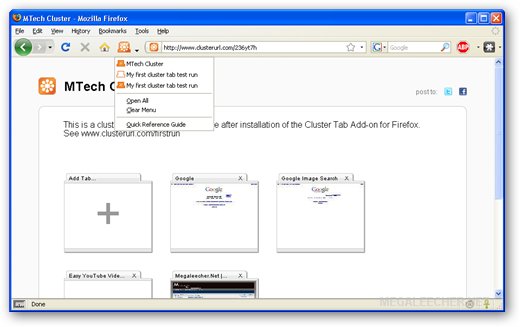
The best part is that every cluster has a unique anonymous cluster URL which can be shared with friends and published on internet like this.
Cluster Tabs for Firefox Features :
* Tabs held within a cluster tab stop using memory resulting in faster performance.
* Tabs within a cluster tab retain history which means that you can carry on from where you left off. Close any tab and it will return to the cluster tab it came from.
* Your history is private.??History in tabs within Cluster URLs is retained in your browser only. No one sees anyone else’s history.
* When you add or remove tabs from a cluster you did not create yourself, a copy is made for you and a new clusterURL is spun out into the web.
* No sign up, simply install and go. Cluster tabs for Firefox and clusterurl.com are anonymous and free.
You can install Cluster Tabs from our Power User firefox addon collection here.
Source : http://www.megaleecher.net/Firefox_Tabs
Microsoft Bangladesh introduces DST
Microsoft Bangladesh announced a patch based fix to address the Day Light Saving Time (DST), which is supposed to be effective in Bangladesh from June 19th at 11PM on Monday. This fix can be downloaded from Microsoft's corporate website by going to here and will be applicable to Computers running on Microsoft operating systems like Windows Vista, Windows XP, Windows Server 2008 and Windows Server 2003.
Users have to download the .msi file from the given website, run it and then choose "(GMT+06:00) DHAKA" option from the "Time Zone Settings" instead of "Astana, Dhaka" and check on the "AUTOMATICALLY ADJUST CLOCK FOR DAY LIGHT SAVING TIME" to enable DST. This would automatically adjust the clock on June 19th at 11PM from when the DST would be effective.
Source : IT Report [The New Nation]
An optional update is available to update the Daylight Saving Time for Bangladesh for the year 2009 for Windows XP, Windows Server 2003, Windows Vista and Windows Server 2008 based computers
Problem description
According to an announcement from the Bangladesh government, the Bangladesh cabinet has decided to advance Bangladesh Standard Time by one hour from 23:00:00 June 19th to save electricity during evening peak hours. The clock will move one hour forward at 23:00:00 on June 19th. No DST end date has been announced yet. There was no DST for Bangladesh prior to this announcement.
Please be aware that if the government of Bangladesh determines an end date for DST after this KB has been published, that DST End date will not be reflected in this Microsoft Fix it solution.
More Information
This update creates a separate time zone for Bangladesh with the following DST setting:
* DST starts at 23:00:00 on June 19th, 2009
* DST ends at 23:00:00 on December 31st, 2009*
* Note The TZI value in the registry requires DST end date and time, thus Dec 31st, 2009 is set for now until future changes overwrite it.
This Fix it Solution adds the following to the Time zone: drop down in Date and Time settings: (GMT +06:00) Dhaka in addition to (GMT +06:00) Astana, Dhaka.
To have us update the DST for Bangladesh for you, go to the "Fix it for me" section. To update the DST for Bangladesh yourself, go to the "Let me fix it myself" section.
Fix it for me
To update the DST for Bangladesh automatically, do the following:
1. Click the Fix it button or link. Click Run in the File Download dialog box, and then follow the steps in the Fix it wizard.
Fix this problem [MicrosoftFixit50280.msi]
2. After the Fix it Solution is applied you must set your time zone to (GMT +06:00) Dhaka in the Date and Time settings in the Control Panel for your machine to use the new DST settings.
Note This Fix it solution works for all languages. However, for some languages, the wizard text may be in English.
Note If you are not on the computer that has the problem, save the Fix it solution to a flash drive or to a CD, and then run it on the computer that has the problem.
Next, go to the "Did this fix the problem?" section.
Let me fix it myself
To update the DST for Bangladesh yourself, follow the instructions described in KB914387. For more information, click the following article number to view the article in the Microsoft Knowledge Base:
914387 How to configure daylight saving time for Microsoft Windows operating systems
Did this fix the problem?
APPLIES TO
* Windows Vista Business
* Windows Vista Enterprise
* Windows Vista Home Basic
* Windows Vista Home Premium
* Windows Vista Ultimate
* Microsoft Windows XP Home Edition
* Microsoft Windows XP Professional
* Microsoft Windows XP Professional 64-Bit Edition (Itanium)
* Windows Server 2008 R2 Datacenter
* Windows Server 2008 R2 Enterprise
* Windows Server 2008 R2 Standard
* Microsoft Windows Server 2003 R2 Datacenter Edition (32-Bit x86)
* Microsoft Windows Server 2003 R2 Datacenter x64 Edition
* Microsoft Windows Server 2003 R2 Enterprise Edition (32-Bit x86)
* Microsoft Windows Server 2003 R2 Enterprise x64 Edition
* Microsoft Windows Server 2003 R2 Standard Edition (32-bit x86)
* Microsoft Windows Server 2003 R2 Standard x64 Edition
* Microsoft Windows Server 2003, Web Edition
* Microsoft Windows Server 2003, Datacenter Edition (32-bit x86)
* Microsoft Windows Server 2003, Datacenter Edition for Itanium-Based Systems
* Microsoft Windows Server 2003, Datacenter x64 Edition
* Microsoft Windows Server 2003, Enterprise x64 Edition
* Microsoft Windows Server 2003, Enterprise Edition (32-bit x86)
* Microsoft Windows Server 2003, Enterprise Edition for Itanium-based Systems
* Microsoft Windows Server 2003, Standard x64 Edition
* Microsoft Windows Server 2003, Standard Edition (32-bit x86)
* Microsoft Windows Small Business Server 2003 Premium Edition
More Details : Microsift Help and Support
Users have to download the .msi file from the given website, run it and then choose "(GMT+06:00) DHAKA" option from the "Time Zone Settings" instead of "Astana, Dhaka" and check on the "AUTOMATICALLY ADJUST CLOCK FOR DAY LIGHT SAVING TIME" to enable DST. This would automatically adjust the clock on June 19th at 11PM from when the DST would be effective.
Source : IT Report [The New Nation]
An optional update is available to update the Daylight Saving Time for Bangladesh for the year 2009 for Windows XP, Windows Server 2003, Windows Vista and Windows Server 2008 based computers
Problem description
According to an announcement from the Bangladesh government, the Bangladesh cabinet has decided to advance Bangladesh Standard Time by one hour from 23:00:00 June 19th to save electricity during evening peak hours. The clock will move one hour forward at 23:00:00 on June 19th. No DST end date has been announced yet. There was no DST for Bangladesh prior to this announcement.
Please be aware that if the government of Bangladesh determines an end date for DST after this KB has been published, that DST End date will not be reflected in this Microsoft Fix it solution.
More Information
This update creates a separate time zone for Bangladesh with the following DST setting:
* DST starts at 23:00:00 on June 19th, 2009
* DST ends at 23:00:00 on December 31st, 2009*
* Note The TZI value in the registry requires DST end date and time, thus Dec 31st, 2009 is set for now until future changes overwrite it.
This Fix it Solution adds the following to the Time zone: drop down in Date and Time settings: (GMT +06:00) Dhaka in addition to (GMT +06:00) Astana, Dhaka.
To have us update the DST for Bangladesh for you, go to the "Fix it for me" section. To update the DST for Bangladesh yourself, go to the "Let me fix it myself" section.
Fix it for me
To update the DST for Bangladesh automatically, do the following:
1. Click the Fix it button or link. Click Run in the File Download dialog box, and then follow the steps in the Fix it wizard.
Fix this problem [MicrosoftFixit50280.msi]
2. After the Fix it Solution is applied you must set your time zone to (GMT +06:00) Dhaka in the Date and Time settings in the Control Panel for your machine to use the new DST settings.
Note This Fix it solution works for all languages. However, for some languages, the wizard text may be in English.
Note If you are not on the computer that has the problem, save the Fix it solution to a flash drive or to a CD, and then run it on the computer that has the problem.
Next, go to the "Did this fix the problem?" section.
Let me fix it myself
To update the DST for Bangladesh yourself, follow the instructions described in KB914387. For more information, click the following article number to view the article in the Microsoft Knowledge Base:
914387 How to configure daylight saving time for Microsoft Windows operating systems
Did this fix the problem?
APPLIES TO
* Windows Vista Business
* Windows Vista Enterprise
* Windows Vista Home Basic
* Windows Vista Home Premium
* Windows Vista Ultimate
* Microsoft Windows XP Home Edition
* Microsoft Windows XP Professional
* Microsoft Windows XP Professional 64-Bit Edition (Itanium)
* Windows Server 2008 R2 Datacenter
* Windows Server 2008 R2 Enterprise
* Windows Server 2008 R2 Standard
* Microsoft Windows Server 2003 R2 Datacenter Edition (32-Bit x86)
* Microsoft Windows Server 2003 R2 Datacenter x64 Edition
* Microsoft Windows Server 2003 R2 Enterprise Edition (32-Bit x86)
* Microsoft Windows Server 2003 R2 Enterprise x64 Edition
* Microsoft Windows Server 2003 R2 Standard Edition (32-bit x86)
* Microsoft Windows Server 2003 R2 Standard x64 Edition
* Microsoft Windows Server 2003, Web Edition
* Microsoft Windows Server 2003, Datacenter Edition (32-bit x86)
* Microsoft Windows Server 2003, Datacenter Edition for Itanium-Based Systems
* Microsoft Windows Server 2003, Datacenter x64 Edition
* Microsoft Windows Server 2003, Enterprise x64 Edition
* Microsoft Windows Server 2003, Enterprise Edition (32-bit x86)
* Microsoft Windows Server 2003, Enterprise Edition for Itanium-based Systems
* Microsoft Windows Server 2003, Standard x64 Edition
* Microsoft Windows Server 2003, Standard Edition (32-bit x86)
* Microsoft Windows Small Business Server 2003 Premium Edition
More Details : Microsift Help and Support
Subscribe to:
Posts (Atom)